KYC Mobile SDK and Dashboard: Secure Identity Verification for iOS, Android, React Native and Flutter
Digital onboarding is now the front door of most financial, telecom and fintech services. Customers expect to open an account from their phone in minutes, while regulators expect you to know exactly who they are. A KYC mobile SDK lets you meet both expectations by embedding identity verification directly into your own app, without sending users to a third-party web flow.
At SCSoft, we built our KYC Mobile SDK for teams that want strong verification, full control over the user experience, and a short integration path. It comes with a powerful dashboard that gives you complete visibility into every verification flow, with role-based access and performance insights. This article explains what a KYC SDK does, what to look for when choosing one, and how ours works.
What Is a KYC Mobile SDK?
A KYC (Know Your Customer) mobile SDK is a software development kit that adds identity verification features to a mobile application. Instead of building document scanning, chip reading and biometric analysis from scratch, developers integrate a ready-made library and call it from their app.
A modern eKYC SDK typically covers:
- Identity document capture and data extraction
- Reading the secure chip in ID cards and passports
- Face matching between the document and the live user
- Liveness detection to confirm a real person is present
- Secure delivery of results to your backend
- A dashboard to review evidence, monitor flows and analyze verification performance
Core Features of the SCSoft KYC SDK
MRZ Scanning and Parsing
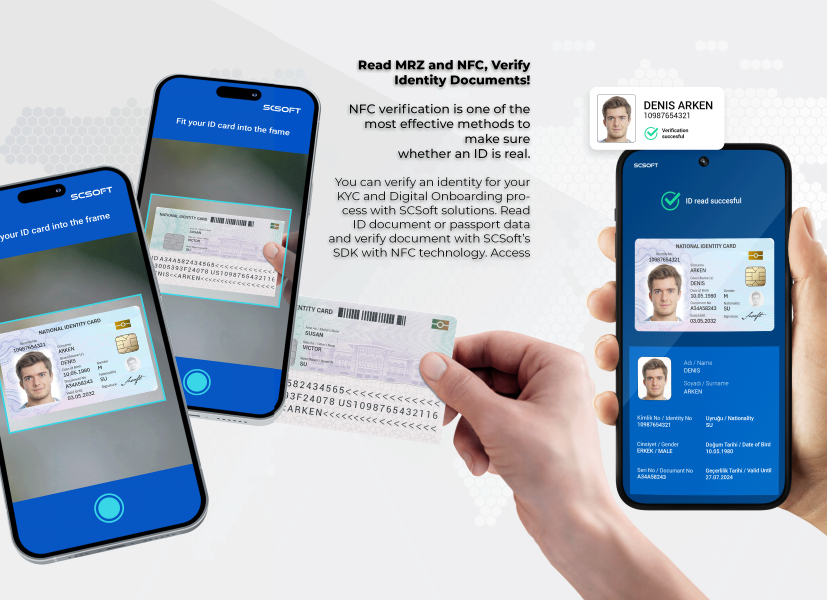
Passports and many ID cards carry a Machine Readable Zone (MRZ) printed at the bottom of the document. Our MRZ scanner SDK reads and decodes this zone directly from the camera feed, extracting fields such as name, document number, date of birth, nationality and expiry date.
This saves users from typing long data fields by hand, which cuts down on input errors and drop-offs. The MRZ data is also what unlocks the next step: NFC chip reading.
NFC Chip Reading
Visual checks alone are no longer enough. Printed documents can be forged, but the electronic chip in an ePassport or chip-enabled ID card holds signed data that is far harder to fake.
Our NFC ID reader SDK lets a smartphone read the chip on supported documents, using the MRZ data to establish secure access. The app can then retrieve the holder’s data and the high-quality facial photo stored on the chip, and use it as a trusted reference for biometric comparison.
AI-Powered Face Biometrics
Once the SDK has a reference photo, whether from the chip or the document, it compares it with a selfie of the user. Our AI-based face biometrics SDK analyzes facial features and returns a match result your backend can use in its decision flow.
Liveness Detection
A face match is only meaningful if the face belongs to a live person in front of the camera. Our liveness detection SDK helps protect against common spoofing attempts such as printed photos, screen replays and other presentation attacks. This is a key layer for fraud prevention in remote onboarding.
One KYC SDK, Every Major Mobile Stack
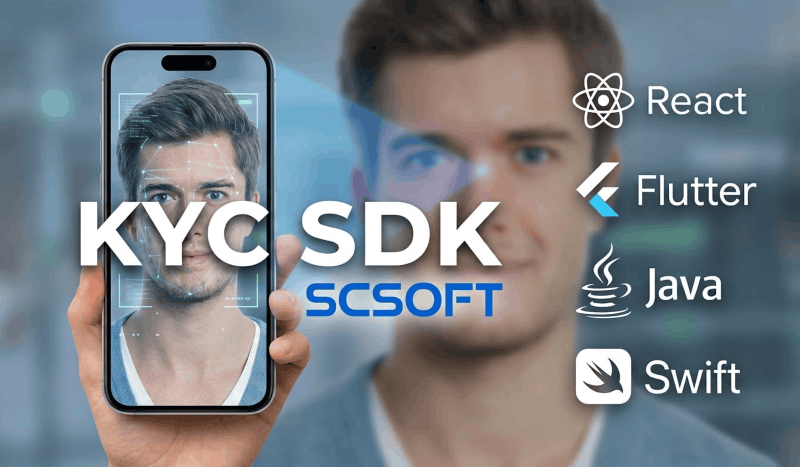
Teams build mobile apps in different ways, and a verification SDK should not force you to change yours. SCSoft provides:
- Native Android (Java and Kotlin)
- Native iOS (Swift)
- React Native
- Flutter
Native libraries give you performance and tight control over camera and NFC handling, while the React Native and Flutter SDKs let cross-platform teams ship on both platforms from a single codebase, with the same verification capabilities.
More Than an SDK: A Powerful Dashboard Built In
A KYC mobile SDK captures the data, but your teams also need a place to see, review and act on it. That is why SCSoft’s solution comes with a KYC dashboard alongside the SDK, not as a separate product you have to build or buy elsewhere.
All Evidence in One Place
Every piece of evidence collected by the mobile SDK is available in the dashboard, including:
- Scanned document images and MRZ data
- Data and facial photo read from the NFC chip
- Selfie captures, face matching results and liveness detection outcomes
Compliance, risk and operations teams can review individual cases, understand why a verification passed or failed, and keep a clear record for audits.
Review Every Verification Flow
The dashboard lets you inspect every verification flow from start to finish. Instead of seeing only a final approved or rejected status, your teams can follow each step a customer went through and see exactly what happened along the way.
Visualized Reports
Built-in visualized reports turn verification activity into insights you can act on. Instead of digging through raw logs, your teams can follow onboarding performance, spot trends and identify issues at a glance.
Role-Based Access Control
Verification data is sensitive, and not everyone in your organization needs to see all of it. The dashboard supports role-based authorization, so you can define who can view, review and manage verification data according to their responsibilities.
Server-Side Transaction and Timing Analysis
Performance matters in onboarding, because every extra second can cost you a customer. The dashboard lets you examine all operations performed on the server along with their durations. You can see where time is spent in the verification process, find bottlenecks and fine-tune your flow for a faster, smoother customer experience.
With the SDK and dashboard working together, you get the full picture: verification inside your app, and complete visibility and control behind the scenes.
A Typical Verification Flow
- Scan the ID document or passport to capture the MRZ.
- Read the NFC chip using the MRZ-derived access data.
- Capture a selfie and run liveness detection.
- Match the live face against the chip or document photo.
- Review the results and all collected evidence in the SCSoft dashboard, or send them to your backend for risk evaluation and final approval.
The whole sequence takes place inside your app, under your branding, which keeps users in a familiar environment and helps conversion.
How to Choose a KYC SDK: A Short Checklist
When comparing identity verification SDKs, ask:
- Does it support both MRZ and NFC, not just OCR?
- Does it include liveness detection against spoofing?
- Are there native and cross-platform versions for your tech stack?
- Can the UI be customized to match your brand?
- Does it include a dashboard with reporting, role-based access and performance analysis, or will you need to build your own?
- How is user data handled, and can the flow meet your regulatory and privacy requirements?
- Is there technical support and documentation to shorten integration time?
Who Is It For?
Our KYC Mobile SDK suits banks, fintechs, insurance companies, telecom operators, payment institutions, crypto platforms and any business that needs remote customer onboarding or re-authentication.
Get Started with SCSoft
If you are evaluating a KYC mobile SDK for your iOS, Android, React Native or Flutter app, we would be glad to show you how MRZ scanning, NFC reading, face biometrics, liveness detection and our dashboard fit together in your use case.
Contact SCSoft to request a demo or talk with our team about your onboarding requirements.